
The Future of Work Arrives With Apple Vision Pro
The Apple Vision Pro isn’t just a headset—it’s Apple’s boldest step toward reshaping how we work, create, and communicate. Powered by the M5 chip, this advanced spatial computer blurs the line between physical and digital spaces, turning your living room into a futuristic workspace.
- The Future of Work Arrives With Apple Vision Pro
- 1. What Makes the Apple Vision Pro So Revolutionary
- 2. Setting Up: From Desk Chaos to Spatial Calm
- 3. Real-World Productivity Test
- 4. Can It Really Replace a Home Office?
- 5. Limitations and Realistic Expectations
- 6. The Bigger Picture: Apple’s Spatial Computing Vision
- 7. Final Verdict: A Glimpse of Tomorrow’s Work
In this real user review, we explore whether the Apple Vision Pro M5 can genuinely replace a traditional home office setup. Can a sleek headset really outperform multiple monitors, a desk, and a laptop? Let’s find out.
1. What Makes the Apple Vision Pro So Revolutionary
Apple’s Vision Pro is a mixed-reality headset designed to combine the digital world with your physical surroundings. Instead of being locked into one screen, you can open and arrange countless virtual displays—all floating in your personal space.
With the latest M5 chip, Apple boosts processing speed, graphics performance, and multitasking capability. Users report smoother transitions between apps, less visual lag, and a more natural feel when working with multiple virtual windows.
The Vision Pro M5 is not just about power; it’s about presence—creating the illusion that your apps, notes, and browser tabs exist right in front of you in 3D space.
2. Setting Up: From Desk Chaos to Spatial Calm
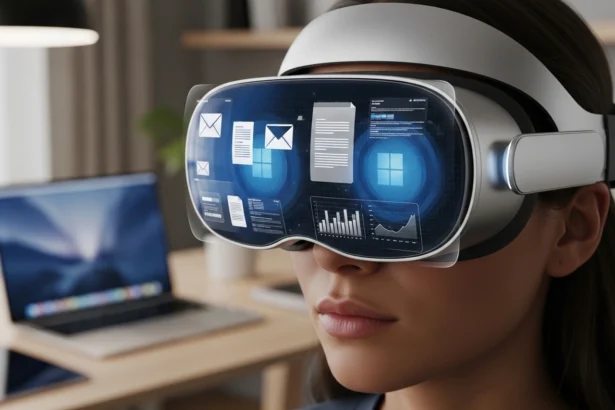
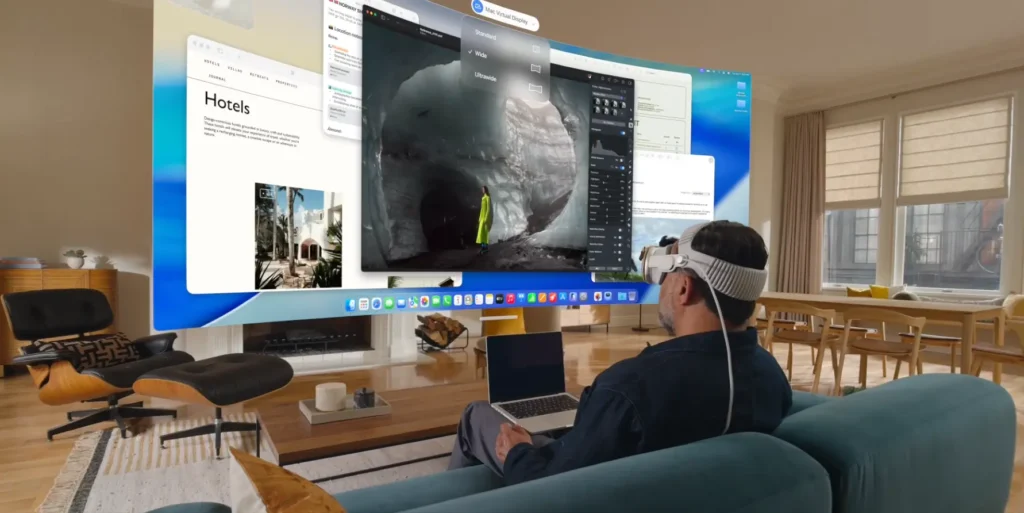
Imagine walking into your home office—but instead of multiple screens, cables, and clutter, you simply put on the Apple Vision Pro. Within seconds, your workspace appears:
- A floating 32-inch virtual MacBook Pro display
- A second screen for emails or notes
- A third window for video calls
You can resize, reposition, and organize your “screens” with a glance or a simple hand gesture. The device connects seamlessly with your MacBook or iPad Pro, mirroring and expanding your workspace.
It’s futuristic, minimal, and shockingly practical.
3. Real-World Productivity Test
Over two weeks of real-world testing, the Vision Pro M5 proved surprisingly capable of handling full workdays.
Here’s what stood out:
Multitasking Power:
Running multiple productivity apps—Safari, Notes, Mail, and Zoom—was smooth with no noticeable lag. The M5 chip handled spatial multitasking like a champ.
Focus and Immersion:
The immersive environment eliminates real-world distractions. You can literally “turn off” the background noise by adjusting the immersive setting, helping you stay focused during long work sessions.
App Integration:
Apple’s ecosystem shines here. You can sync your iCloud files, hand off your iPad apps, and even use your MacBook keyboard seamlessly within the Vision Pro environment.
Comfort Upgrades:
The new Dual Knit Band design distributes weight evenly, reducing neck strain. The device feels much more comfortable for 2-3 hour sessions compared to the earlier version.
4. Can It Really Replace a Home Office?
So, can the Apple Vision Pro M5 replace your home office setup? The short answer: for most users—yes, almost.
Here’s a breakdown:
| Feature | Traditional Setup | Vision Pro M5 |
|---|---|---|
| Screen Space | Limited by monitors | Virtually unlimited |
| Portability | Stationary | Fully mobile |
| Distractions | High | Minimal |
| Cost | Moderate | Premium |
| Comfort (long hours) | Depends on chair/setup | Improved but not perfect |
The Apple Vision Pro shines for digital workers, remote teams, and creative professionals who value flexibility and focus. You can carry your “office” anywhere—a coffee shop, a hotel, or your couch.
5. Limitations and Realistic Expectations
Of course, it’s not perfect. Here are some downsides that early users report:
- Battery Life: Around 2.5 hours per charge (extendable via external battery).
- Weight: Although lighter than before, extended wear still causes mild fatigue.
- Software Gaps: Not all macOS or iPadOS apps have been fully optimized for visionOS.
- Social Factor: Working in a headset can feel isolating in shared spaces.
Still, as Apple refines the Vision Pro experience, these limitations are quickly shrinking.
6. The Bigger Picture: Apple’s Spatial Computing Vision
The Apple Vision Pro M5 represents a key step in Apple’s “post-screen” future—where we move beyond physical displays and into spatial computing.
With tighter integration between MacBook Pro M5, iPad Pro, and Vision Pro, Apple is building an ecosystem where your workspace follows you—not the other way around.
Future software updates promise enhanced AI assistance, gesture accuracy, and lightweight external accessories to make all-day use even more feasible.
7. Final Verdict: A Glimpse of Tomorrow’s Work
After using the Apple Vision Pro for two weeks, it’s clear: this isn’t just another gadget. It’s a paradigm shift in how we experience productivity.
If you’re a digital nomad, designer, developer, or creative pro tired of physical clutter, the Vision Pro M5 might be your ultimate workstation. While it won’t replace every physical tool yet, it comes impressively close.
Verdict: The Apple Vision Pro M5 won’t just change how you work—it will change where you work.