
The OnePlus 15 marks a bold step forward for OnePlus — not just in hardware, but in how it blends intelligence and design. Launched with OxygenOS 16, this device represents more than an upgrade; it’s a transformation in how smartphones interact with users.
- The Foundation of Smart Simplicity: OxygenOS 16 Overview
- AI Live Dialogue: The Future of Intelligent Interaction
- One-Click Flash: Redefining Mobile Photography
- Mind Space + Gemini: OnePlus’ AI Brain
- Beyond AI: Subtle Enhancements You’ll Actually Feel
- Ecosystem Intelligence: When Devices Think Together
- Design Harmony: Software Meets Hardware
- Hidden Gems Comparison: Where OxygenOS 16 Outshines Rivals
- Expert Insight: Why OnePlus’ AI Feels More Human
- Pros & Cons Snapshot
- FAQs
OxygenOS 16 focuses on AI-driven intelligence, privacy, and human-centric design. It creates a seamless connection between your phone’s software and your lifestyle. From AI Live Dialogue to One-Click Flash, this update hides more power beneath its polished surface than most users realize.
With impressive OnePlus 15 specs and thoughtful innovations, the phone delivers an experience that feels both smart and personal.
The Foundation of Smart Simplicity: OxygenOS 16 Overview
Built on Android 16, OxygenOS 16 introduces meaningful upgrades in privacy, accessibility, and personalization. Its new design tagline — “Breathe with You. Thrive with Free Expression” — reflects the brand’s philosophy of freedom and individuality.
Core System Upgrades
- Revamped Quick Settings and Control Center
- Fluid animations using the new ‘Liquid Glass’ design language
- An advanced privacy dashboard powered by Private Computing Cloud
- Overall interface evolution — smoother, cleaner, and lighter
Combined with the latest OnePlus 15 chipset, these refinements make everyday use more responsive and power-efficient.
AI Live Dialogue: The Future of Intelligent Interaction
What It Is
AI Live Dialogue is an intelligent conversational assistant built into OxygenOS 16. It works with Gemini AI and Mind Space, enabling natural communication through voice or text.
How It Works
The feature learns from user behavior stored in Mind Space. It offers smarter, faster suggestions by understanding your context. It can summarize long texts, translate calls, and even automate small tasks.
Real-World Applications
- Summarize messages or YouTube captions instantly
- Translate phone calls in real time
- Schedule reminders or manage photos via quick dialogue
Why It’s a Hidden Gem
Unlike most assistants, AI Live Dialogue is deeply integrated across OxygenOS 16 — from the gallery and browser to messaging apps — making the OnePlus 15 feel more aware and adaptive.
One-Click Flash: Redefining Mobile Photography
The Concept
The OnePlus 15 camera gains a major edge with One-Click Flash — an AI-powered mode that adjusts light and exposure instantly. It’s designed for users who want pro-quality photos without complex settings.
How It Works
This feature uses advanced AI to fine-tune shutter speed, flash brightness, and color tones in real time. It’s especially useful in low-light or moving scenes.
Why It Matters
Creators can capture studio-grade photos with one tap, reducing the need for editing. Combined with Hasselblad tuning, this feature turns the OnePlus 15 camera into a serious creative tool.
Mind Space + Gemini: OnePlus’ AI Brain
OxygenOS 16 introduces Mind Space, a new AI hub that stores your screenshots, notes, and reminders. This data works with Google Gemini to provide contextual help.
For example, if you save a travel ticket, Gemini can suggest flight reminders or packing lists. This reduces mental clutter and keeps information organized. It’s a small yet powerful upgrade that makes the OnePlus 15 smarter every day.
Beyond AI: Subtle Enhancements You’ll Actually Feel
Fluid Cloud 2.0
Interactive bubbles on the lock screen display real-time updates like weather, messages, and events.
Smart Scene Optimizer 2.0
This system learns your usage habits to balance OnePlus 15 battery performance, brightness, and refresh rate automatically.
Customizable Grid & Icons
You can choose from flexible grid layouts (4×6, 5×6, 5×7) and resize widgets. It helps personalize the OnePlus 15 display exactly how you like it.
Private Computing Cloud
All AI learning happens locally, keeping your personal data secure on the device.
Ecosystem Intelligence: When Devices Think Together
OxygenOS 16 pushes connectivity to new levels. With O Plus Connect, users can control their PC or Mac directly from their OnePlus 15.
It also enables smooth photo sharing between OnePlus and iPhone devices, plus syncing across tablets, TVs, and earbuds. This integrated ecosystem shows how OnePlus is building a truly connected digital lifestyle.
Design Harmony: Software Meets Hardware
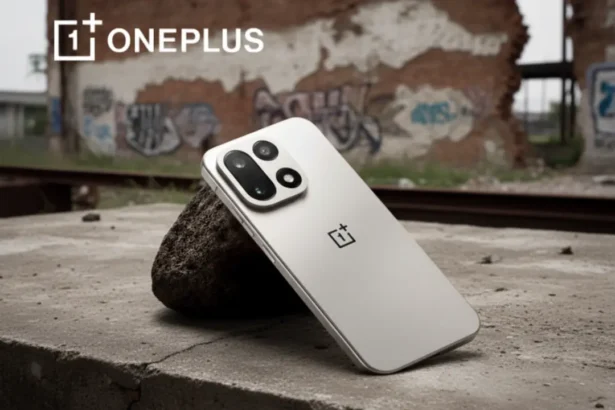
The OnePlus 15 design harmonizes perfectly with OxygenOS 16. The slim frame, refined edges, and premium build complement the new UI.
Key hardware details:
- OnePlus 15 chipset: Snapdragon 8 Gen 4 optimized for AI tasks
- OnePlus 15 display: 6.8-inch QHD+ AMOLED Pro panel with 120 Hz refresh rate
- OnePlus 15 battery: 5000 mAh with smart AI power management and ultra-fast charging
- OnePlus 15 color options: Classic Black, Frosted Silver, and Emerald Green
The AI features adjust refresh rate, temperature, and brightness dynamically — all to ensure comfort and longevity.
Hidden Gems Comparison: Where OxygenOS 16 Outshines Rivals
| Feature | OxygenOS 16 (OnePlus 15) | One UI 7 (Samsung) | Pixel UI 15 (Google) |
|---|---|---|---|
| Conversational AI | ✅ Deep Gemini Integration | ✅ Galaxy AI | ✅ Gemini Native |
| Contextual Camera Flash | ✅ One-Click Flash | ❌ | ❌ |
| Ecosystem Sync | ✅ O Plus Connect | ✅ Samsung Flow | ⚙️ Partial |
| Private AI Cloud | ✅ Yes | ⚙️ Limited | ⚙️ Limited |
| Dynamic UI Customization | ✅ Full control | ⚙️ Medium | ⚙️ Minimal |
The OnePlus 15 clearly stands out for its smooth software synergy and creative tools.
Expert Insight: Why OnePlus’ AI Feels More Human
OnePlus designed its AI features to be assistive, not intrusive. The system quietly adapts to your habits instead of interrupting you.
This approach helps users focus on what matters — the phone works intuitively in the background. With OxygenOS 16, the OnePlus 15 becomes more than a flagship; it’s a thoughtful companion.
Pros & Cons Snapshot
| Pros | Cons |
|---|---|
| Deep Gemini + Mind Space AI integration | Some features may be region-limited |
| AI-enhanced OnePlus 15 camera | Potential battery optimization period |
| Refined, customizable UI | AI Live Dialogue not yet available globally |
| Enhanced privacy & cross-device sync | Updates may roll out gradually |
FAQs
1. What is AI Live Dialogue in OxygenOS 16?
It’s a smart voice and text assistant that understands context and responds naturally, available on the OnePlus 15 with OxygenOS 16.
2. How do I enable One-Click Flash on OnePlus 15?
You can turn it on in the camera settings under “AI Tools.” It enhances brightness and clarity automatically in low light.
3. Does OxygenOS 16 support older OnePlus devices?
Yes, it will roll out to selected older models after the OnePlus 15 release date.