
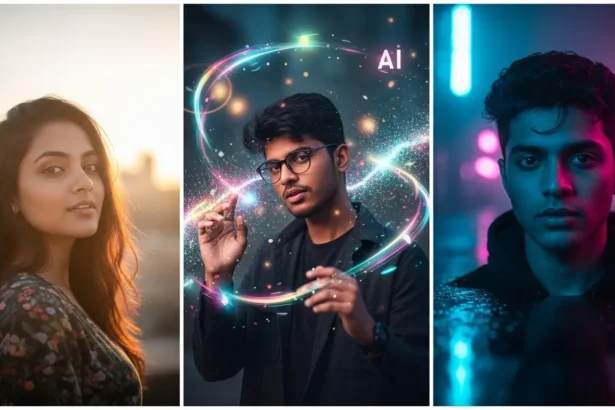
In 2025, Gemini AI has taken the world by storm. Built by Google, this next-generation AI model is not just smart—it’s creative. From generating ultra-realistic portraits to dreamy fantasy scenes, Gemini AI has become a go-to tool for artists, photographers, and content creators.
But here’s the secret: the magic lies in the prompts. The right prompt can transform a simple idea into a breathtaking image that looks like it was shot with a DSLR.
So, whether you’re an AI art enthusiast, social media creator, or digital designer, here are the Top 25 Gemini AI prompts to help you create stunning visuals in 2025.
What Are Gemini AI Prompts?
A Gemini AI prompt is the text instruction you give the AI to tell it what to create.
Think of it as your camera’s direction list—you decide the subject, mood, lighting, and style.
For example:
Basic prompt: “A mountain landscape.”
Gemini prompt: “Cinematic Himalayan mountain sunrise, golden light, 8K ultra-realistic detail, DSLR-style composition.”
The second one gives Gemini AI context, emotion, and style—which leads to breathtaking results.
Why Gemini AI Is Leading the Image Revolution
Gemini AI isn’t just another image generator. It’s designed to understand emotion, realism, and creativity. Compared to Midjourney or DALL·E, Gemini AI’s image understanding is sharper and more cinematic.
Here’s why creators will love it in 2025:
- Smarter Context Understanding—It interprets details like “sunlight through leaves” perfectly.
- Hyper-Realistic Rendering – Creates DSLR-quality portraits and movie-like scenes.
- Fast and Precise Output – Generates images in seconds without losing detail.
- Diverse Styles—From Indian bridal photography to futuristic sci-fi art, it handles all with ease.
How to Write Effective Gemini AI Prompts
Creating with Gemini AI is like directing a movie scene—every detail counts.
Here’s a simple structure you can follow:
[Subject] + [Mood/Emotion] + [Lighting] + [Camera Style] + [Environment/Details]
Example:
“A couple laughing under fairy lights, warm romantic lighting, cinematic lens blur, bokeh background, ultra-realistic style.”
Prompt Tips:
- Use descriptive adjectives (vibrant, dreamy, cinematic, ultra-detailed).
- Add camera details (DSLR, depth of field, lens blur).
- Specify lighting (soft light, golden hour, neon glow).
- Include style (anime, vintage film, editorial, fantasy).
Top 25 Gemini AI Prompts to Create Stunning Images in 2025
Below are the most powerful Gemini AI prompts categorized by themes
1. Dreamy Golden Hour Portrait
Edit this image to create a warm golden hour effect. Add soft sunlight rays hitting the subject’s face, natural lens flares, and glowing highlights on hair. Keep the skin tone natural with smooth texture, enhance background blur for a cinematic bokeh look, and use a cozy golden-orange color palette for a romantic vibe.2. Futuristic Cyber Street Edit
Transform this photo into a futuristic cyberpunk night scene. Add glowing neon billboards, holographic reflections on wet pavement, and a misty atmosphere. Keep the subject illuminated by cool blue and pink lights, enhance contrast, and apply a moody sci-fi color grade for a Tokyo 2080 aesthetic.3. Soft Spring Portrait
Enhance this portrait with soft pastel tones inspired by springtime. Add a light pink and cream color palette, gentle sunlight glow, and blurred cherry blossom elements in the background. Retain facial clarity with subtle skin smoothing and dreamy lighting around edges.4. Cinematic Urban Morning
Edit this image to capture an early morning city vibe. Add soft fog rising between skyscrapers, cool blue lighting, and long street shadows. Enhance contrast lightly, bring out building details, and give the image a crisp, cinematic documentary feel.5. Rainy City Reflections
Create a cinematic rainy-day look with glowing reflections on wet roads and blurred motion lights from passing cars. Add a cool tone grade with teal and amber highlights, soft drizzle effect, and subtle fog to give depth. Keep the subject’s silhouette sharp for a dramatic composition.6. Fashion Editorial Glow
Enhance this photo with professional magazine-style retouching. Add clean white studio lighting, balanced shadows, high clarity on clothing textures, and a subtle glossy finish. Use a neutral background tone to create a luxury editorial effect.7. Vintage Film Look
Edit this photo with a retro film style — faded colors, light leak streaks, and a subtle grain texture. Slightly lower saturation, enhance contrast, and add warm sepia tones for an authentic 1980s Polaroid aesthetic.8. Beach Sunset Cinematic Tone
Transform this beach photo with warm golden-orange sunset lighting, glowing reflections on the water, and soft shadow depth. Enhance cloud textures, slightly blur the horizon, and create a cinematic glow around the subject for a peaceful, romantic look.9. Night Sky Portrait
Edit this image so the background shows a star-filled night sky with glowing constellations. Add cool blue light reflections on the subject’s face, slightly darken the shadows, and introduce soft light flares for a magical stargazing vibe.10. Natural Light Forest Edit
Enhance this image with a natural woodland aesthetic. Boost green tones, add filtered sunlight through tree leaves, create soft shadows, and increase the vibrancy of the environment. Keep the subject naturally lit and surrounded by warm, earthy color balance.11. Street Festival Glow
Add vibrant light from hanging lanterns, glowing reflections on the ground, and crowds slightly blurred in motion. Keep the main subject illuminated by warm reds and yellows, increase color contrast, and create an energetic celebration vibe.12. Artistic Watercolor Transformation
Stylize this photo into a semi-watercolor artwork. Soften edges, add pastel brush textures, enhance color saturation slightly, and create soft blending between tones. Keep facial features recognizable but artistic, blending realism with creativity.13. Cold Winter Street Edit
Transform this photo into a chilly winter scene. Add falling snow, frosty air mist, and soft lighting from street lamps. Adjust the color palette to icy blue and white tones, lower saturation, and enhance contrast to emphasize the cold atmosphere.14. Bohemian Outdoor Look
Edit this portrait with a warm boho aesthetic. Add sunlight leaks, soft beige and orange tones, slightly faded colors, and glowing lens flares. Keep textures detailed and natural for an earthy, artistic outdoor vibe.15. Dramatic Spotlight Portrait
Enhance this photo using high-contrast lighting. Add a focused spotlight on the subject’s face, darken the background, and emphasize shadows for a bold, theatrical mood. Use a moody black and red tone for intensity and cinematic flair.16. Moody Cafe Aesthetic
Edit this photo to create a cozy indoor café vibe. Add warm amber lighting from hanging bulbs, soft bokeh from background tables, and reflections on coffee mugs. Enhance shadows for depth, give the image a brown-orange cinematic tone, and keep the subject softly lit by window light.17. Midnight Rooftop Scene
Transform this image into a moody rooftop night shot. Add soft city lights below, gentle moonlight glow above, and haze from distant buildings. Keep the subject’s silhouette sharp with a cool-toned color grade (blue and violet), enhancing cinematic contrast for a peaceful yet mysterious tone.18. Sunlit Field Portrait
Edit this portrait with bright golden sunlight pouring through a field of tall grass. Enhance glow around hair edges, warm up the color palette, and slightly blur the background. Use soft lens flares, creamy light tones, and DSLR-style bokeh for a dreamy countryside effect.19. Festival Night Energy
Add colorful string lights, stage glows, and moving crowd blurs for a lively music festival vibe. Enhance contrast with neon blues and pinks, add motion light streaks, and make the subject pop with clarity. Keep the overall edit energetic and cinematic.20. Minimalist Clean Look
Enhance this image with a minimalist edit — bright white background, balanced exposure, neutral tones, and clean contrast. Reduce visual clutter, sharpen subject edges, and use soft natural shadows for a sleek, professional aesthetic.21. Emotional Rain Portrait
Edit this image with light rain falling on the subject, water droplets on face and clothes, and glowing reflections behind them. Add a cool desaturated color palette with deep shadows and cinematic lighting to create an emotional storytelling effect.22. Vibrant Festival Colors
Enhance this photo with bright, saturated festival colors — pink, orange, yellow, and blue tones popping in daylight. Add confetti or flower petals in motion, slightly blur the background, and boost vibrancy for a cheerful, festive atmosphere.23. Misty Mountain Edit
Add rolling fog clouds around mountain peaks, boost contrast in rocks and trees, and soften sky tones. Use a cold gray-blue palette for a cinematic adventure mood, and enhance texture clarity in the landscape foreground.24. Studio Creative Lighting
Transform this portrait with creative studio lighting — half-face shadow, split lighting with magenta and cyan tones, and high-contrast background. Keep skin texture realistic, boost clarity, and emphasize the lighting design for a professional artistic finish.25. Reflection Art Edit
Add a large puddle or reflective glass surface in the image foreground, mirroring the subject and environment. Enhance highlights, balance symmetry, and apply a cinematic teal-orange tone to give a poetic, storytelling atmosphere.Tips to Use These Prompts Effectively
- Add camera models (Canon EOS, Sony Alpha) to get realistic focus depth.
- Mention aspect ratio (e.g., “–ar 16:9”) for cinematic framing.
- Include lighting style (e.g., “soft diffused light”, “studio backlight”).
- Use style blending: “portrait + cyberpunk + cinematic” for unique results.
Conclusion
Gemini AI is redefining how we create art in 2025. With just a few words, you can turn imagination into visual reality. These 25 Gemini AI prompts are your creative fuel—whether you’re building content, editing portraits, or exploring new artistic ideas.
So go ahead—open Gemini, try these prompts, and watch your creativity come alive.
Which prompt will you try first? Share your favorite Gemini AI image in the comments or tag us on social media!